Steel Metal: The Heavy-Duty Typeface for Bold Branding
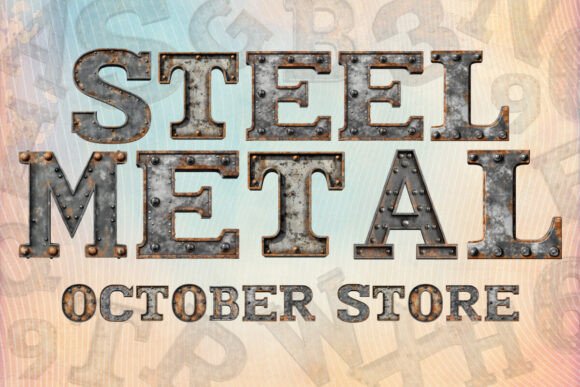
If you’ve ever walked through an industrial district or watched a construction site in action, you know the feeling of raw strength and unyielding durability. Translating that physical power into a digital design isn't easy. You can’t just use a standard Arial or Times New Roman and expect to convey "heavy-duty." You need a typeface that carries the visual weight of the materials it represents. Enter Steel Metal, a bold decorative font that doesn’t just sit on the page; it occupies space with authority. Designed to mimic the look of shiny, silver steel, this font brings a tactile, metallic quality to your typography that standard vector outlines simply cannot achieve.
For designers, small business owners, and content creators, the struggle is often finding a font that captures a specific "vibe" without requiring hours of custom shading or 3D rendering. Steel Metal solves this by offering a pre-rendered industrial aesthetic. Each letter features a distinct metallic texture, giving your text an immediate sense of weight and substance. This isn't just a typeface; it is a design asset built for projects that demand a modern, tough, and uncompromising look. Whether you are designing a logo for a security firm, creating merchandise for a rock band, or building a header for a gaming website, the visual language of this font speaks volumes before the reader even processes the words.
Understanding the Metallic Aesthetic
The appeal of a chrome or steel finish in design lies in its association with precision, technology, and permanence. In the world of typography, this style falls into the category of display fonts—typefaces designed specifically for headlines and short bursts of text rather than long-form reading. Steel Metal excels in this niche because it leverages modern font technology to deliver a complex visual effect with the ease of typing.
Unlike traditional fonts that are defined by simple vector paths and solid colors, Steel Metal is an OpenType-SVG color font. This is a crucial detail for any creative professional to understand. The "SVG" stands for Scalable Vector Graphics, which allows the font file to contain high-resolution bitmap images or complex vector gradients directly within the glyph. When you type a letter, you aren't just drawing a shape; you are placing a small, textured graphic that looks like polished metal.
This technology allows for a level of realism that was previously impossible with standard text tools. You get the highlights, the shadows, and the grain of steel without needing to apply layer styles in Photoshop or extrusions in Illustrator. It streamlines the workflow significantly. For a busy entrepreneur or a graphic designer juggling multiple clients, being able to achieve a premium, 3D look in seconds is a massive advantage. It allows you to focus on the overall composition of your design rather than getting bogged down in technical effects.
Practical Applications: Where Steel Metal Shines
Because of its distinct style, this typeface isn't a "one-size-fits-all" solution for body text, but it is a powerhouse for specific applications. Understanding where to deploy a heavy, industrial font is key to effective visual communication.
Consider the world of branding and logo design. If you are launching a brand that deals with automotive parts, construction services, security systems, or extreme sports, your logo needs to convey resilience. Steel Metal provides that instant recognition. It tells the customer immediately that your brand is robust and reliable. It pairs exceptionally well with sans serif fonts used for sub-text, creating a hierarchy that is both readable and visually striking.
In packaging design, shelf appeal is everything. A product like an energy drink, a hardware tool, or a specialty hot sauce needs a label that pops. Using this font for the product name can create a 3D effect that makes the packaging feel more premium and tactile. It suggests that the product inside is powerful and high-quality.
For the digital realm, specifically social media graphics and web design, attention spans are short. You have milliseconds to stop a user from scrolling. A header image on a website or a title card for a YouTube video rendered in a shiny, metallic font creates an immediate focal point. It adds a layer of "production value" to your content, making a small business look like a major corporation. It is particularly effective for:
- Gaming Channels: Creating intros, overlays, and thumbnails that fit the tech/gaming aesthetic.
- Fitness Brands: Promoting "hardcore" workout plans or supplements.
- Event Flyers: Designing posters for concerts, car shows, or industrial expos.
- Merchandise: Creating designs for T-shirts and hoodies where the graphic needs to stand out on fabric.
Even in editorial design, such as magazine covers or blog post feature images, a drop cap or a pull quote in Steel Metal can break up the monotony of standard text and draw the reader’s eye to a key statistic or quote.
Technical Considerations and Compatibility
While the visual output of Steel Metal is stunning, it is vital to ensure it fits into your technical ecosystem. As mentioned, this is an OpenType-SVG font. This format is widely supported by modern professional design software, but there are nuances to be aware of to avoid frustration.
The font is fully compatible with Adobe Photoshop, Adobe Illustrator, and Silhouette Studio. These programs handle the complex color data of SVG fonts beautifully, allowing you to scale the text and apply it to your designs seamlessly. It is also compatible with Inkscape, making it a great option for designers who rely on open-source software.
However, it is important to note where this font will not work. The OTF and TTF files provided are not compatible with Cricut design software. Because Cricut machines require specific vector outlines to cut physical materials, and because this font relies on embedded imagery for its texture, the software cannot process it. If you are a crafter using a Cricut machine, you would need to use this font in a separate program like Photoshop to create a flattened image (like a PNG) and then import that image into Cricut Design Space to use as a "Print then Cut" feature. You cannot use it as a direct typing font within the Cricut app.
For those new to using color fonts, it is highly recommended to review the Ultimate Font Guide provided by the creator. Understanding how to toggle "Contextual Alternates" or manage OpenType features in your specific software can make the difference between a standard gray font and the intended shiny steel effect.
Strategic Pairing and Design Tips
Using a display font like Steel Metal requires a bit of strategy to maintain readability and professionalism. Because the font has such a strong personality, using it for every word in a design can be overwhelming and difficult to read. Here is how to get the most out of it:
The 10% Rule: Use Steel Metal for roughly 10% of your text—usually the headline or the main focal point. The other 90% should be a clean, neutral typeface. A classic sans serif like Montserrat, Roboto, or a geometric sans serif works perfectly. The clean lines of the supporting font will contrast with the complex texture of the steel, making the headline pop even more.
Background Matters: Metallic textures rely on contrast. If you place Steel Metal on a busy, high-contrast background (like a detailed photo of a forest), the letters might get lost. It works best on solid, dark backgrounds (black, navy, charcoal) or clean, light backgrounds (white, light grey). This allows the "shiny" aspect of the font to breathe and reflect light effectively.
Size Matters: This is a display font, meaning it is meant to be seen at larger sizes. If you try to use Steel Metal at 12pt for a paragraph, the metallic texture will turn into visual noise, and the text will be illegible. Keep it large—think 48pt and above. This ensures the texture is visible and contributes to the design rather than hindering readability.
Color Coordination: Since the font is inherently silver/chrome, it is a neutral metallic. This makes it incredibly versatile. It pairs well with red for a "danger" or "power" vibe, blue for a "tech" or "corporate" vibe, and yellow for an "industrial caution" vibe.
Commercial Licensing and Project Value
When investing in a premium font, particularly one with specialized technology like OpenType-SVG, it is not just a purchase of a file; it is an investment in your brand's toolkit. A creative font like this can be used across multiple assets over the life of a brand.
Think about the longevity of the design. A logo created with Steel Metal can be used on business cards, website headers, vehicle wraps, and storefront signage. The consistency of using the same high-quality typeface across all these touchpoints builds brand recognition. When a customer sees that distinct, heavy-duty text, they immediately associate it with your business.
Furthermore, having access to a unique typeface saves money in the long run. Instead of hiring a 3D artist to render text every time you need a "metallic" look for a social media post or a flyer, you simply type it out. This efficiency is invaluable for small business owners who manage their own marketing.
As you explore your options for typography, consider what your project truly needs. If you are looking for a subtle, minimalist look, a standard serif font or a light sans serif font might be the better choice. But if your goal is to grab attention, convey strength, and deliver a high-impact visual message, Steel Metal offers a distinct advantage. It bridges the gap between static text and graphic design, providing a tool that is as tough and versatile as the material it emulates.